Base64 vs Base64URL: When to Use Which (and How to Convert)
Base64 and Base64URL share one algorithm but differ in two characters: + and / become - and _. Learn why JWTs use Base64URL and how to convert in one line.
Base64 comes in two flavors that look nearly identical yet are quietly incompatible: standard Base64 and Base64URL. If you've ever pasted a JWT into a generic Base64 decoder and gotten "invalid input," or stuffed a Base64 string into a URL and watched it fall apart, you've already met the difference between these two — you just may not have known it had a name.
Let's cover what each one is, why they exist, where you'll run into them, and how to convert between them in a single line.
Same algorithm, different alphabets
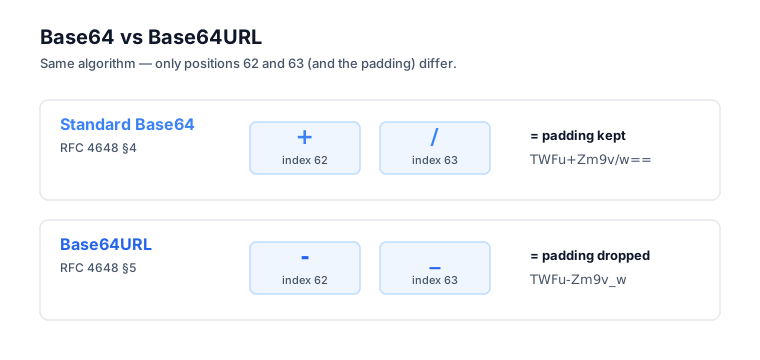
The two variants share one algorithm and differ in exactly two characters. Both take binary data, group it into 6-bit chunks, and map each chunk to a character. The only thing that changes is which characters sit at positions 62 and 63 in the alphabet:
| Position | Standard Base64 | Base64URL |
|---|---|---|
| 62 | + | - |
| 63 | / | _ |
| Padding | = | = (often stripped) |
Everything else is identical. A-Z, a-z, and 0-9 map to positions 0 through 61 in both, and the transformation math — 3 bytes in, 4 characters out — is the same. This split is written into the spec itself: RFC 4648 §4 defines the standard alphabet (+ and /), and RFC 4648 §5 defines the "URL and Filename Safe" alphabet (- and _).
That's genuinely the entire difference. So why does it cause so much grief? Because of where the strings end up. (If you want the full picture of how the encoding itself works, see What Is Base64 Encoding.)
The problem: URLs have opinions about characters
URLs reserve +, /, and = for their own meanings, so standard Base64 breaks the moment it lands in one. Those characters are perfectly harmless in most places — HTTP headers, JSON values, MIME-encoded email, config files. URLs, though, play by their own rules:
+in a query string gets read as a space when URL-decoded, a quirk inherited fromapplication/x-www-form-urlencoded./is a path separator — drop it in a path and you've conjured a sub-path that doesn't exist.=is the key/value separator in query strings, so?token=abc=is ambiguous.
Take this perfectly valid Base64 string:
SGVsbG8sIHdvcmxkIQ==
And try to use it in a URL:
https://api.example.com/verify?token=SGVsbG8sIHdvcmxkIQ==
Now you've got bugs. The = might be treated as separating extra empty params, and if the string had contained + or /, those would get mangled by URL decoding or read as path components.
Base64URL fixes all three problems at once: + becomes -, / becomes _, and the = padding gets stripped (the length is implied anyway). The result drops into URLs without any escaping or re-encoding.
Where you'll see each variant
Use standard Base64 for content and Base64URL for anything bound for a URL or filename — that one rule covers nearly every case. Here's where each actually shows up.
Standard Base64 — +, /, with = padding — turns up wherever the result lives inside another format that doesn't restrict characters:
- HTTP basic auth headers:
Authorization: Basic dXNlcjpwYXNz(user:pass, encoded) - MIME email attachments: binary files encoded for SMTP transport
- PEM certificate format: TLS certs wrapped between
-----BEGIN CERTIFICATE-----markers - Data URIs:
data:image/png;base64,iVBORw0K...for inline images in HTML/CSS - JSON payloads: when binary data needs to travel as a string
Base64URL — -, _, no padding — shows up wherever the value has to survive a URL or filename:
- JWTs: header, payload, and signature are all Base64URL — RFC 7515 §2 defines JWS encoding as RFC 4648 §5 "with all trailing '=' characters omitted," which is exactly why you can paste a JWT into a URL parameter and it just works
- JWE (encrypted tokens): same reasoning as JWT
- OAuth/OIDC redirect parameters:
state,code_verifier,noncevalues - Webhook signatures in URL parameters: Stripe, GitHub, and others use URL-safe encoding here
- Filenames generated from binary IDs: to dodge filesystem trouble with
/
The rule of thumb writes itself: if it's going in a URL or a filename, use Base64URL.
A worked example: encoding a JWT payload
The two encodings often produce the same output — they only diverge when the bytes happen to hit a +, /, or padding. Say you're hand-crafting a JWT payload. You start with:
{"sub":"alice","role":"admin"}
Encoded as standard Base64:
eyJzdWIiOiJhbGljZSIsInJvbGUiOiJhZG1pbiJ9
Encoded as Base64URL — and in this case it's identical, because there's no +, /, or = to swap:
eyJzdWIiOiJhbGljZSIsInJvbGUiOiJhZG1pbiJ9
Now change the role to Süper Adm/n instead (a made-up case with diacritics and a slash):
{"sub":"alice","role":"Süper Adm/n"}
Standard Base64:
eyJzdWIiOiJhbGljZSIsInJvbGUiOiJTw7xwZXIgQWRtL24ifQ==
Base64URL:
eyJzdWIiOiJhbGljZSIsInJvbGUiOiJTw7xwZXIgQWRtL24ifQ
Notice the == is gone, and had the encoded output contained / or +, those would have been swapped too. This is the version that's safe to drop straight into a JWT or a URL parameter. You can test both encodings yourself with the Base64 Encoder, or decode JWT-style Base64URL strings with the JWT Decoder.
Converting between them (one-liners)
Converting is just a character swap plus an optional padding fix — no re-encoding of the underlying bytes. Standard to URL-safe: replace + with -, / with _, and strip the =. Going the other way, reverse the swaps and re-add = until the length is a multiple of four. Here are the one-liners in the major languages (for fuller, copy-paste encoding snippets, see How to Base64 Encode in JavaScript, Python, and curl).
JavaScript
// Base64 → Base64URL
const toUrlSafe = (s) => s.replace(/\+/g, '-').replace(/\//g, '_').replace(/=+$/, '');

// Base64URL → Base64
const toStandard = (s) => {
  const pad = (4 - s.length % 4) % 4;
  return s.replace(/-/g, '+').replace(/_/g, '/') + '='.repeat(pad);
};
Python
import base64

# Standard → URL-safe
url_safe = base64.urlsafe_b64encode(data).rstrip(b'=')

# URL-safe → Standard
padding = b'=' * (4 - len(url_safe) % 4)
standard = base64.b64decode(url_safe + padding)
Node.js (Buffer)
// Decode Base64URL directly (Node 16+)
Buffer.from(b64url, 'base64url').toString('utf-8');

// Encode to Base64URL
Buffer.from(data).toString('base64url');
Go
import "encoding/base64"

// URL-safe with padding stripped
base64.RawURLEncoding.EncodeToString(data)
base64.RawURLEncoding.DecodeString(encoded)
Common bugs from mixing the two
Almost every Base64 bug in the wild comes from using one variant where the other belongs. Four show up constantly — and if you're debugging a token specifically, JWT Claims Explained walks through what each decoded segment should contain.
A JWT payload fails in a generic Base64 decoder. You paste a payload like eyJzdWIiOiJ-xyz_abc into atob() and get an error. The fix: convert to standard Base64 first by swapping - → +, _ → /, and adding padding back.
A Base64-encoded URL parameter gets mangled in transit. You generate a state parameter as standard Base64 and drop it into ?state=AbC+def/ghi==. The receiving server sees AbC def/ghi — the + turned into a space. The fix: use Base64URL from the start.
Filenames with / in them. You name files using Base64-encoded IDs, and some IDs encode to strings containing /, which spawns phantom subdirectories. The fix: use Base64URL for anything used as a filename.
Length mismatch after stripping padding. A Base64 string of length 22 (three bytes short of a multiple of 4) tells a strict decoder "this is invalid." The fix: re-add the implied padding before handing it to a strict implementation.
How to remember which is which
Standard Base64:
+/=— fine for content, breaks in URLs.Base64URL:
-_— fine in URLs, often appears unpadded.
If you're producing Base64 bound for a URL, a JWT, a filename, or an HTTP query parameter, default to Base64URL. For everything else — JSON values, HTTP bodies, data URIs — standard Base64 is the safer default, simply because it's what most tools expect to receive.
The bottom line
Same algorithm, two different alphabets, and the only difference is +/ versus -_. Standard Base64 is for content; Base64URL is for URLs. JWTs use Base64URL because they travel through URLs, cookies, and headers, and converting between the two is just a three-character substitution plus an optional padding re-add. When you're unsure whether a value needs to be URL-safe, default to Base64URL.
Need to test conversions? The Base64 Encoder handles both variants — paste, encode, copy. Need to decode the parts of a JWT? The JWT Decoder does the Base64URL → JSON conversion automatically.
Frequently asked questions
What's the difference between Base64 and Base64URL?
They run the identical encoding algorithm and differ in only two characters. Standard Base64 (RFC 4648 §4) uses + and / at positions 62 and 63, while Base64URL (§5) uses - and _ instead. Base64URL also typically drops the = padding so the string is URL- and filename-safe.
Why does JWT use Base64URL?
JWTs travel through URLs, HTTP headers, and cookies, where + / and = characters get mangled or misread. RFC 7515 defines JWS to use Base64URL (RFC 4648 §5 with padding omitted) so the header, payload, and signature drop into those places unescaped and decode back cleanly every time.
Can I decode Base64URL with a standard Base64 decoder?
Not directly. A standard decoder chokes on - and _ and on the missing padding. Convert first by swapping - back to +, _ back to /, then re-adding = until the length is a multiple of four. After that conversion, any standard Base64 decoder reads it without complaint.
Does Base64URL always omit the padding?
Usually, but not always. RFC 7515 mandates omitting trailing = for JWTs, and most URL-safe encoders strip it by default. RFC 4648 §5 still permits padding, so some implementations keep it. When in doubt, strip padding before comparing and re-add it before decoding.