What is Base64 Encoding? A Complete Primer
Base64 explained from scratch: how it turns 3 bytes into 4 ASCII characters (a ~33% size increase), the 64-character alphabet, padding, and URL-safe variants.
You've almost certainly seen a string like SGVsbG8sIHdvcmxkIQ== show up in an HTTP header, a data URI, or a JWT and wondered what on earth it was. That's Base64 — and despite how cryptic it looks, it's one of the simplest encodings in all of computing. By the end of this, you'll understand exactly how it works, why it exists in the first place, and the handful of pitfalls that trip up most developers.
It's encoding, not encryption
Start here, because this is the single most important thing to know about Base64:
Base64 is not secret. It's a deterministic, reversible transformation. Anyone with the encoded string can decode it right back to the original.
If you actually need to keep something private, encrypt it first, and then Base64-encode the ciphertext if you need to ship it through a text-only channel. Encrypting after encoding doesn't make anything secret — it just adds a layer of obfuscation that any junior developer can peel off in seconds.
Decode any Base64 string instantly — no installation, no upload, everything runs in your browser.
Why does Base64 exist?
Base64 exists to push binary data safely through channels that were only ever designed to carry text. A lot of protocols and formats — early email (MIME), HTTP headers, JSON, XML, URL parameters — were built to carry printable ASCII characters only. Push raw binary through those channels and you risk certain bytes getting interpreted as control codes, line terminators, or protocol delimiters. Things break in confusing ways.
Base64 sidesteps all of that by encoding any binary data into a string made of just 64 safe characters. The result travels anywhere ASCII can go — emails, JSON payloads, query strings, config files, HTML attributes — without a single byte being misread along the way.
How Base64 actually works
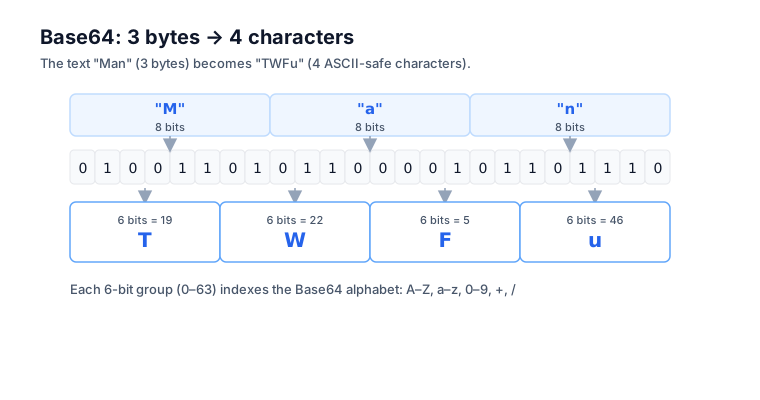
The algorithm is elegant in its simplicity. Take your input, group it into 3-byte chunks (24 bits each), then split each chunk into four 6-bit groups. Each 6-bit value, which lands somewhere from 0 to 63, maps to one character in the Base64 alphabet. RFC 4648 Section 4 spells it out exactly: "The encoding process represents 24-bit groups of input bits as output strings of 4 encoded characters."
Watch it encode the word "Cat" step by step:
Input:   "Cat"  →  bytes: 67, 97, 116
Binary:  01000011 01100001 01110100
Regroup: 010000 110110 000101 110100  (four 6-bit values)
Decimal: 16     54     5      52
Output:  Q      2      F      0       (positions in alphabet)
Result:  "Q2F0"
That's the entire algorithm. Three bytes in, four characters out. And that 3:4 ratio is exactly where the famous 33% size inflation comes from — every 3 bytes of binary turn into 4 bytes of ASCII.
The 64-character alphabet
The standard Base64 alphabet is A-Z, a-z, 0-9, +, /, in that order, filling positions 0 through 63:
0–25  →  A B C D E F G H I J K L M N O P Q R S T U V W X Y Z
26–51 →  a b c d e f g h i j k l m n o p q r s t u v w x y z
52–61 →  0 1 2 3 4 5 6 7 8 9
62    →  +
63    →  /
This is the alphabet defined by RFC 4648. Knowing it helps when you're debugging encoded strings by hand — you can work out, for example, that "Q" sits at position 16 because Q is the 17th letter and the alphabet starts counting at A=0.
There's also a separate alphabet, Base64URL, that swaps + and / for - and _ to be URL-safe. More on that below.
What about padding? (The = characters)
You've seen Base64 strings ending in = or ==. Those are padding characters, tacked on when the input isn't a clean multiple of 3 bytes.
"Cat"   (3 bytes) →  "Q2F0"      (no padding)
"Cats"  (4 bytes) →  "Q2F0cw=="  (2 padding chars)
"Cat!"  (4 bytes) →  "Q2F0IQ=="  (2 padding chars)
"Catty" (5 bytes) →  "Q2F0dHk="  (1 padding char)
The pattern is mechanical:
- Input length % 3 == 0 → no padding
- Input length % 3 == 1 → output ends with
== - Input length % 3 == 2 → output ends with
=
The = is never in the middle of a valid Base64 string — it always lives at the very end. That's a quick eyeball test for corrupted Base64 data. Some variants, like Base64URL in JWTs, strip the padding entirely because the length is already implied, and most decoders accept Base64 with or without it.
UTF-8 and Base64: the trick that matters
Encode "hello" directly and every encoder on the planet gives you the same thing: aGVsbG8=. But encode "안녕" or "🌍" and you'll get different results depending on how the encoder treats non-ASCII characters. This is where a lot of cross-language bugs are born.
The right approach is always the same: encode the string to UTF-8 bytes first, then Base64-encode those bytes. MDN's btoa() docs are blunt about why: btoa interprets each character's code point as a byte value, so anything above 0xff throws an InvalidCharacterError. The fix is TextEncoder, which converts a string into its UTF-8 bytes. In JavaScript:
// Wrong (only works for ASCII):
btoa('안녕');  // throws: "string contains characters outside Latin1"

// Right:
const bytes = new TextEncoder().encode('안녕');
btoa(String.fromCharCode(...bytes));  // → "7JWI64WV"
Or, more concisely, with the older idiom:
const encoded = btoa(unescape(encodeURIComponent('안녕')));
// → "7JWI64WV"
Decoding just runs the same path in reverse — Base64-decode to bytes, then UTF-8 decode the bytes back into a string. The Base64 Encoder handles all of this automatically, so you can paste any UTF-8 string (Korean, Japanese, emoji) and it round-trips cleanly. For the full set of copy-paste snippets across runtimes, see how to Base64-encode in JavaScript, Python, and curl.
Base64 vs Base64URL
The short answer: Base64URL is the same encoding with two characters swapped so it's safe to drop into a URL. Standard Base64 uses + and /, and both of those carry special meaning inside URLs. Drop a standard Base64 string into a URL parameter and two things go wrong: + gets read as a space when the URL is decoded, and / is treated as a path separator.
Base64URL fixes this by swapping the two troublemakers:
| Standard Base64 | Base64URL |
|---|---|
+ | - |
/ | _ |
= padding | (typically stripped) |
This variant is defined in RFC 4648 Section 5, which calls it "technically identical" to standard Base64 except for the 62nd and 63rd alphabet characters. JWTs use Base64URL for exactly this reason — they travel in HTTP headers, cookies, and URL parameters, all of which need URL-safe encoding. The JWT Decoder handles the Base64URL → JSON conversion for you. If you want the two variants side by side, the deep dive on Base64 vs Base64URL covers every difference.
Converting between the two is just a character substitution:
// Base64 → Base64URL
b64.replace(/\+/g, '-').replace(/\//g, '_').replace(/=+$/, '');

// Base64URL → Base64
b64url.replace(/-/g, '+').replace(/_/g, '/');  // re-add padding if needed
The size cost
Base64 inflates your data by about 33% — every 3 bytes of binary become 4 bytes of ASCII, plus up to 2 padding bytes. The math falls straight out of the RFC 4648 grouping: 4 output characters carry the information of 3 input bytes, a 4:3 ratio that's a one-third increase.
For small payloads — a 2KB thumbnail in a data URI, an API key in a header, a JWT — that overhead is a fine price for the convenience. For larger data like video streams or big file uploads, the 33% tax starts to hurt, which is why those protocols tend to use multipart upload or chunked transfer instead.
Some rough numbers to keep in your back pocket:
| Original size | Base64 encoded |
|---|---|
| 1 KB | ~1.37 KB |
| 100 KB | ~137 KB |
| 1 MB | ~1.37 MB |
| 1 GB | ~1.37 GB |
If your encoded data lands inside JSON, factor in string escaping too — though Base64's character set doesn't need escaping in JSON, so the only JSON overhead is the surrounding quotes.
Where you'll see Base64 in the wild
Base64 shows up anywhere a text-only format needs to embed some bytes. That's more places than you'd guess:
- Data URIs —
data:image/png;base64,iVBORw0KGgo...for embedding small images directly in HTML or CSS - Basic auth —
Authorization: Basic <base64(user:password)> - JWT tokens — the header, payload, and signature parts are all Base64URL
- MIME email attachments — binary attachments get Base64-encoded for SMTP transport
- TLS certificates — PEM format wraps the binary certificate in Base64 between BEGIN/END markers
- CSS — embedded fonts via
@font-facewith data URIs - Webhook payloads — APIs often deliver binary data (file uploads, attached images) as Base64 strings in JSON
- Public keys — SSH and PGP keys are frequently distributed as Base64 strings
The pattern is consistent: if a protocol carries text and needs to embed some bytes, you'll usually find Base64 underneath.
Common gotchas
A few traps catch developers over and over.
Line breaks in MIME-encoded Base64. Older specs, MIME in particular, require Base64 to wrap at 76 characters per line — RFC 2045 Section 6.8 states the encoded output "must be represented in lines of no more than 76 characters each." Most modern uses don't wrap at all, but if you're parsing email attachments, strip the newlines first or use a decoder that handles them.
Confusing URL encoding with Base64. They're different beasts. URL encoding turns a space into %20; Base64 turns binary bytes into ASCII characters. You sometimes need both layered together — Base64-encode the binary, then URL-encode the result (or just use Base64URL and skip a step).
Padding stripped when it shouldn't be. Some libraries strictly check padding and reject input missing its = characters. If you're getting "invalid Base64" errors, try adding the padding back: s += '='.repeat((4 - s.length % 4) % 4).
Forgetting it's not encrypted. API keys, tokens, and passwords sitting inside Base64 are still effectively plain text. Don't drop secrets into client-side code just because they're Base64-encoded — anyone can decode them in one step.
UTF-8 handling. If your test strings are all ASCII but production has international characters, you'll hit encoder mismatches. Always route through UTF-8 first.
Quick reference
| Task | One-line |
|---|---|
| Encode in JS (ASCII) | btoa('hello') |
| Decode in JS (ASCII) | atob('aGVsbG8=') |
| Encode in Node | Buffer.from('hello').toString('base64') |
| Decode in Node | Buffer.from('aGVsbG8=', 'base64').toString() |
| Encode in Python | base64.b64encode(b'hello').decode() |
| Decode in Python | base64.b64decode('aGVsbG8=').decode() |
| Encode in shell | `echo -n 'hello' |
| Decode in shell | `echo 'aGVsbG8=' |
The bottom line
Base64 is a translation layer between binary and text — nothing more, nothing less. The algorithm is straightforward (3 bytes → 4 ASCII characters), the alphabet is fixed (A-Z, a-z, 0-9, +, /), and the math is consistent (that 33% size inflation). Where people get tripped up is forgetting it's not encryption, mishandling UTF-8, confusing the standard and URL-safe variants, and assuming padding is always there.
Need to encode or decode something right now? The Base64 Encoder handles every variant in your browser — no upload, no install, UTF-8 safe.
Frequently asked questions
Is Base64 encryption?
No. Base64 is a reversible encoding defined in RFC 4648, not encryption. It uses a fixed, public algorithm with no key, so anyone holding the encoded string can decode it back to the original in one step. If you need privacy, encrypt the data first, then Base64-encode the ciphertext for transport.
Why does Base64 add about 33% to the size?
Base64 represents each 24-bit group of 3 input bytes as 4 output characters, per RFC 4648 Section 4. Four characters carrying the information of three bytes is a 4:3 ratio, which works out to roughly a 33% increase. Trailing padding can add up to two more bytes per message.
What characters does Base64 use?
Standard Base64 uses 64 characters — A-Z, a-z, 0-9, plus + and / — to represent values 0 through 63, with = reserved for padding. The URL-safe variant in RFC 4648 keeps the letters and digits but swaps + and / for - and _ so the result is safe in URLs.
Why does btoa() throw on emoji or Korean text?
Per MDN, btoa() treats each character as a single byte, so every code point must be below 256. Characters like 🌍 or 안 sit above that range and raise an InvalidCharacterError. Convert the string to UTF-8 bytes with TextEncoder first, then Base64-encode those bytes.
Does Base64 need to be wrapped at 76 characters?
Only in MIME contexts. RFC 2045 Section 6.8 requires Base64 in email to wrap at no more than 76 characters per line. Most modern uses — JWTs, data URIs, API payloads — emit one unbroken line, so strip newlines before decoding MIME-sourced Base64.