JWT Claims Explained: iss, sub, aud, exp, iat, nbf, jti
RFC 7519 defines 7 registered JWT claims: iss, sub, aud, exp, nbf, iat, jti. Learn what each means, how to validate it, and the checks that stop attacks.
Decode a JWT and the payload reads like a hand of cryptic three-letter abbreviations: iss, sub, aud, exp, iat, nbf, jti. Those are the registered claims — standardized fields defined by the JWT spec, RFC 7519. They're not decoration. Each one carries a specific meaning, and skipping validation on the wrong one opens a real, exploitable hole in your auth.
So let's decode every standard claim and, more importantly, cover the validation each one demands.
What "claims" means
A claim is just a statement about the token's subject — something the issuer is asserting. "This token belongs to user 1234" is a claim. "This token expires at 3pm" is a claim. Nothing fancier than that.
The spec sorts them into three buckets:
- Registered claims — standardized short names (the ones we're about to walk through)
- Public claims — names listed in a public registry to avoid collisions
- Private claims — custom fields you define for your own app, like
roleortenant_id
The registered claims all use three-letter names on purpose, to keep tokens small. There are exactly seven of them, defined in RFC 7519 §4.1. Public claim names live in the IANA JSON Web Token Claims registry, which also lists the OpenID Connect profile claims like name and email if you ever need standardized fields beyond the core seven. Decode a real token with the JWT Decoder and you'll see the claims sitting right there in the payload.
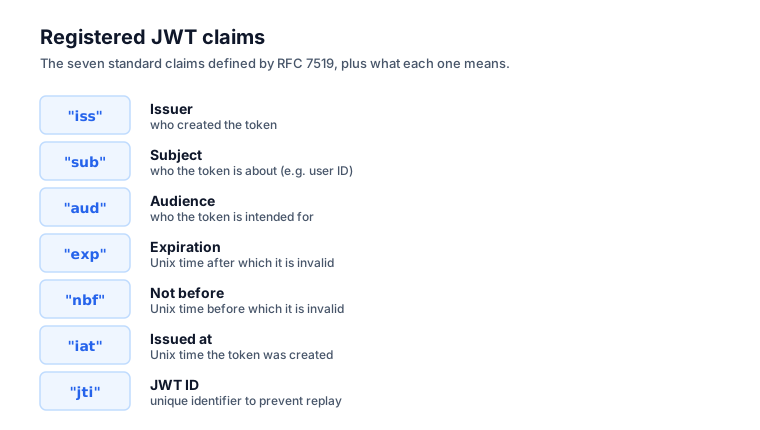
Here are all seven registered claims at a glance:
| Claim | Full name | Meaning | Validate? |
|---|---|---|---|
iss | Issuer | Who created and signed the token | Yes — must match a trusted issuer |
sub | Subject | Who or what the token is about (usually a user ID) | Use to look up the user |
aud | Audience | Who the token is intended for | Yes — must include your service |
exp | Expiration Time | When the token stops being valid | Yes — reject if past |
nbf | Not Before | Earliest moment the token is valid | Yes — reject if before |
iat | Issued At | When the token was created | Optional — flag old tokens |
jti | JWT ID | Unique identifier for one token | Optional — revocation/replay checks |
iss — Issuer
This is who created and signed the token, usually a URL or identifier for your auth server:
"iss": "https://auth.example.com"
What to validate: your service should confirm iss matches the issuer you actually expect. If you only accept tokens from https://auth.example.com, reject anything carrying a different iss. That one check stops tokens from other systems sneaking into yours.
sub — Subject
This is who or what the token is about — typically the user ID:
"sub": "user_12345"
It's usually the claim you care about most, because it identifies the authenticated user. It should be unique and stable for a given user across their lifetime.
What to validate: use it to look up the user, but don't assume it's an email or anything human-readable. It's often an opaque internal ID, and treating it like an email will burn you eventually.
aud — Audience
This is who the token is intended for. A token minted for your API has no business being accepted by a different one:
"aud": "https://api.example.com"
What to validate: this check is critical and skipped constantly. Your service must verify that aud includes your identifier. Without it, a token issued for Service A can be replayed against Service B whenever both trust the same issuer — a classic confused-deputy setup. The OWASP REST Security Cheat Sheet frames it as a question worth asking on every request: "is the relying party in the target audience for this JWT?" Note that aud can be a single string or an array of them.
exp — Expiration Time
This is when the token stops being valid, expressed as a NumericDate. RFC 7519 §2 defines that as "the number of seconds from 1970-01-01T00:00:00Z UTC until the specified UTC date/time" — so it's a Unix timestamp in seconds:
"exp": 1735689600
What to validate: reject the token if the current time is past exp. This is the single most important time check you'll do, because it caps how long a stolen token stays useful. A token with no exp, or one set absurdly far in the future, is a security risk you should treat with suspicion.
One bug bites nearly everyone here: exp is in seconds, but JavaScript's Date.now() is in milliseconds. Forget to multiply by 1000 and every token looks expired the instant you check it. When in doubt, drop the number into the Timestamp Converter and confirm it reads as a sane date.
iat — Issued At
This is when the token was created, again as a Unix timestamp:
"iat": 1735686000
What to validate: it's handy for spotting suspiciously old tokens or enforcing a "maximum token age" policy that's independent of exp. Some systems reject any token issued before a specific event — a password change, for instance — using iat as the cutoff.
nbf — Not Before
This is the earliest moment the token is valid. It shouldn't be accepted before this timestamp:
"nbf": 1735686000
What to validate: reject the token if the current time is before nbf. It's useful for tokens meant to activate at some future point. You'll see it less often than exp, but it's part of complete, by-the-book validation.
jti — JWT ID
This is a unique identifier for one specific token:
"jti": "abc-123-def-456"
What to validate: jti is what makes revocation and replay prevention possible. Keep a blocklist of revoked jti values and you can kill specific tokens before they'd naturally expire. It also lets you notice when the same token is being replayed over and over.
A complete validation checklist
When your backend receives a JWT, proper validation runs roughly in this order:
- Verify the signature — using the issuer's public key or secret. This comes first, because nothing else matters if the signature is bogus.
- Check
exp— reject if expired. - Check
nbf— reject if not yet valid. - Check
iss— reject if it isn't from a trusted issuer. - Check
aud— reject if it isn't meant for your service. - Check
iat— optionally reject suspiciously old tokens. - Check
jti— optionally check against a revocation list.
Most JWT libraries (jose, jsonwebtoken, and friends) handle steps 1 through 5 for you, as long as you pass them the expected iss and aud. The takeaway: don't write your own validation. Use a vetted library and configure it correctly.
The attacks these checks prevent
None of these steps are busywork. Each one blocks a real attack:
- Skip the signature check → anyone can forge any token. The worst mistake on the list.
- Skip
exp→ stolen tokens work forever. - Skip
aud→ a token for one service works on another. This is "token confusion." - Skip
iss→ tokens from untrusted issuers slide right in. - Accept
alg: none→ unsigned tokens pass as valid.
That last one is infamous. Some libraries historically accepted a header of "alg": "none" and skipped signature verification entirely, which means an attacker could hand-craft any payload they wanted. The OWASP Web Security Testing Guide lists this among its core JWT checks — and warns testers to try none in mixed case too, since naive blocklists only catch the lowercase spelling. Always configure your library to require a specific algorithm. If you're hazy on what "signed" even guarantees, see JWT vs JWS vs JWE.
Custom (private) claims
Beyond the registered claims, you'll add your own:
{
  "sub": "user_12345",
  "iss": "https://auth.example.com",
  "aud": "https://api.example.com",
  "exp": 1735689600,
  "iat": 1735686000,
  "role": "admin",
  "tenant_id": "acme-corp",
  "email": "[email protected]"
}
Here role, tenant_id, and email are private claims. Two cautions are worth repeating. First, they're visible — a signed JWT's payload is readable by anyone who holds the token, so never put secrets in there. (For why, see JWT vs JWS vs JWE.) Second, they bloat the token — every claim adds bytes to every single request. Keep tokens lean and look up rarely-needed data server-side instead.
Inspecting claims in practice
To read the claims in any token, paste it into the JWT Decoder. It decodes the Base64URL header and payload and pretty-prints the JSON, so every claim is laid out in front of you. And when you want to know whether an exp or iat timestamp is even reasonable, feed the number to the Timestamp Converter to see it as a human date. If you'd rather do it in code, how to decode a JWT in JavaScript walks through parsing the payload yourself.
The bottom line
The registered claims — iss, sub, aud, exp, iat, nbf, jti — are standardized JWT fields, and complete validation checks the signature first, then exp, nbf, iss, and aud. Skip the aud or iss checks and you've opened the door to token-confusion attacks. Remember that exp and iat are in Unix seconds, not JavaScript milliseconds, and that custom claims are visible and add weight, so keep tokens lean and never store secrets in them. To decode and inspect any token's claims, reach for the JWT Decoder.
Frequently asked questions
Which JWT claims are required?
Technically none. RFC 7519 marks all seven registered claims as optional. In practice, any auth token should carry and validate exp, iss, aud, and sub. Without exp a stolen token never dies, and without aud and iss a token can be replayed across services that trust the same issuer.
Why are the claim names so short?
JWTs ride along in nearly every request, usually in an Authorization header with a size limit. Three-letter names like iss and exp keep the encoded token compact. RFC 7519 chose them deliberately to minimize overhead, since every byte is paid on every single request you make.
Can I trust the email claim in a JWT?
Only if you trust the issuer and have verified the signature. A claim is exactly as trustworthy as whoever signed the token. A valid signature proves the issuer asserted that email, not that the email was ever confirmed. Treat unverified issuers and unsigned tokens as untrusted input.
Is exp in seconds or milliseconds?
Seconds. RFC 7519 defines exp, nbf, and iat as NumericDate values — the seconds since 1970-01-01 UTC, ignoring leap seconds. JavaScript's Date.now() returns milliseconds, so you must divide by 1000 to compare. Forget that and every token looks expired the instant you check it.
What is the alg none attack?
An attacker edits a token's header to set alg to none, claiming it needs no signature. Some libraries historically accepted these as valid and skipped verification, letting anyone forge any payload. Always configure your library to require a specific algorithm and reject none outright.