How to Format JSON: Indentation, Minify & Validate
Format JSON the right way: 2-space vs tab indentation, minification for transport, key ordering, and validation. Includes JSON.stringify code examples.
JSON turns up everywhere — APIs, config files, package manifests, log lines. When it's formatted well, it reads almost like a small spreadsheet, and you can scan it in seconds. When it isn't, debugging a thousand-character single-line payload feels like solving a puzzle blindfolded.
Good formatting comes down to a handful of habits and one reassuring fact: formatting never changes what your JSON means. Here's how to do it right, in your editor and in code.
What "formatting" actually means
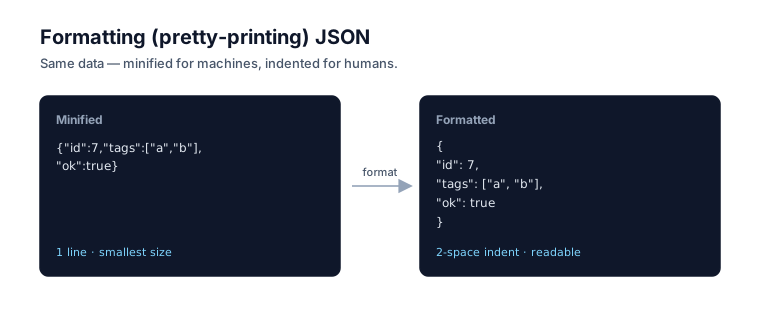
Formatting JSON — also called pretty-printing — means adding whitespace (line breaks and indentation) to make the structure visible. It changes nothing about the data. JSON ignores whitespace between tokens entirely, so a sprawling indented object and its compact one-line version parse to identical values.
This is guaranteed by the spec. RFC 8259, the JSON standard, states that "insignificant whitespace is allowed before or after any of the six structural characters" — the braces, brackets, comma, and colon. The companion grammar standard, ECMA-404, defines the same syntax. Only four characters count as whitespace: space, horizontal tab, line feed, and carriage return. That's why you can reformat a payload freely without fear of corrupting it.
So the choice between formatted and minified is purely about who's reading: a human or a network socket.
Picking an indentation: 2-space vs 4-space vs tabs
Use two spaces. It's the most common convention online and the default in Utilify's JSON Formatter, because it keeps deeply nested objects from drifting halfway across your screen. Four spaces and tabs are equally valid — the spec doesn't care — so the real rule is consistency across a codebase, not the specific width.
Here's the same object in each style so you can see the tradeoff:
// 2-space (compact, scannable)
{
  "user": {
    "name": "alice",
    "roles": ["admin", "editor"]
  }
}

// 4-space (more horizontal drift on deep nesting)
{
    "user": {
        "name": "alice",
        "roles": ["admin", "editor"]
    }
}
| Style | Indent width | Best for | Watch out for |
|---|---|---|---|
| 2 spaces | Narrow | Most code, deeply nested data | None — the safe default |
| 4 spaces | Wide | Shallow structures, matching a 4-space codebase | Horizontal sprawl when nesting is deep |
| Tab | Editor-defined | Teams that prefer tabs everywhere | Inconsistent width across viewers and diff tools |
Whichever you pick, set it once in your formatter or editor config and stop thinking about it. Mixed indentation in one file is the only genuinely wrong answer.
Minification: when and why
Minified JSON strips every byte of optional whitespace down to one line. That's the right form for transport — smaller payloads travel faster — but it's miserable to read or debug. The rule of thumb: keep formatted JSON in version control and on disk, and let your build step or HTTP layer minify it on the way out.
// Formatted (for humans)
{
  "id": 42,
  "active": true
}

// Minified (for the wire)
{"id":42,"active":true}
Don't over-rotate on the byte savings, though. Most servers gzip or brotli-compress responses, and those algorithms already collapse repeated whitespace efficiently — so manual minification earns the most on high-volume APIs and inlined payloads where every byte counts. For a config file a human edits, leave it formatted.
If you want to flip between the two forms quickly, paste your payload into the JSON Formatter; it handles both directions in your browser.
Formatting JSON in JavaScript
JSON.stringify formats JSON in code. Its third argument, space, controls indentation: pass a number for that many spaces, or a string to use as the indent unit. With no third argument, you get minified output. This is the cleanest way to pretty-print programmatically.
const data = { id: 42, tags: ["a", "b"], active: true };

// Pretty-print with 2-space indentation
JSON.stringify(data, null, 2);
/*
{
  "id": 42,
  "tags": [
    "a",
    "b"
  ],
  "active": true
}
*/

// Tab indentation — pass a tab character
JSON.stringify(data, null, "\t");

// Minified — no third argument
JSON.stringify(data);
// {"id":42,"tags":["a","b"],"active":true}
A couple of details worth knowing, straight from the MDN docs for JSON.stringify: a numeric space is clamped to a maximum of 10 — ask for 20 spaces and you get 10. And properties are serialized "using the same algorithm as Object.keys(), which has a well-defined order and is stable across implementations," so JSON.stringify on the same object always produces the same string. That stability is what makes stringified JSON safe to diff and hash.
The middle argument (null above) is the replacer — pass a function or an array of keys to filter or transform values. Most of the time null is exactly what you want.
Key ordering: diffs vs readability
Order keys for whoever consumes the file. For data meant to be diffed — configs, lockfiles, test fixtures — alphabetize the keys so two people editing the same file don't produce noisy, overlapping diffs. For data meant to be read, like an API example in your docs, put the important fields first instead.
One caveat: ordering is a convention, not a guarantee. RFC 8259 notes that "JSON parsing libraries have been observed to differ as to whether or not they make the ordering of object members visible to calling software." Translation: never write code that depends on key order surviving a round trip through an arbitrary parser. Use ordering to help humans, not to encode meaning.
Validate before you format
Always validate first. A formatter will happily pretty-print malformed JSON and hand you something that looks clean while still being broken — a trailing comma or a stray single quote can survive long enough to cause a subtle bug once you start manipulating the data. Validation and formatting are different jobs: one checks correctness, the other improves readability.
Run the payload through the JSON Validator first; it points at the exact character where parsing failed, which narrows the hunt enormously. Once it's clean, format it.
Common pitfalls
Most formatting headaches trace back to syntax JSON doesn't allow. Two habits carried over from JavaScript cause the bulk of them: trailing commas and comments. Neither is legal in standard JSON.
// ❌ Invalid — trailing comma and a comment
{
  "name": "alice", // the admin
  "role": "admin",
}

// ✅ Valid
{
  "name": "alice",
  "role": "admin"
}
If you genuinely need comments in a config file, reach for a relaxed variant like JSON5 or JSONC — but remember those are not JSON, so convert to strict JSON before sending anything to an API. For the full catalog of syntax traps and their fixes, see common JSON errors and how to fix them. And if you're weighing JSON against other config formats, JSON vs XML vs YAML breaks down where each one fits.
The bottom line
Formatting JSON is low-stakes because it can't change your data — RFC 8259 treats the whitespace as insignificant, so reformat freely. Use 2-space indentation for anything a human reads or that lives in version control, and minify only for transport. In code, JSON.stringify(obj, null, 2) pretty-prints and JSON.stringify(obj) minifies. Validate before you format, order keys for your reader rather than for meaning, and strip comments and trailing commas before shipping. When you need to do all of this at once, the JSON Formatter handles indentation, minification, and validation in one place, all in your browser.
Frequently asked questions
How many spaces should JSON use for indentation?
Two spaces is the most common convention and the safest default — it keeps deeply nested structures from sprawling across your screen. Four spaces and tabs are equally valid. JSON treats all of them as insignificant whitespace, so the choice is purely about readability and team consistency.
Should I minify JSON in production?
Minify JSON for network transport, where smaller payloads load faster, but keep formatted JSON in version control and on disk. Most servers also gzip responses, which already shrinks repeated whitespace, so manual minification matters most for high-volume APIs and embedded payloads.
Does formatting change JSON's meaning?
No. Formatting only adds or removes insignificant whitespace between tokens. RFC 8259 explicitly allows whitespace before or after any structural character, so a pretty-printed object and its minified form parse to the exact same data. The bytes differ; the meaning does not.
Can JSON have comments or trailing commas?
No. Standard JSON allows neither. The spec defines a minimal syntax with no comment markers and no trailing comma after the last element. Variants like JSON5 and JSONC permit both, but they are not JSON — convert them to strict JSON before sending to an API.
How do I format JSON in JavaScript?
Use JSON.stringify with its third argument: JSON.stringify(obj, null, 2) produces 2-space indentation. Pass a number up to 10 for spaces, or a string like a tab character for tab indentation. Calling JSON.stringify(obj) with no third argument minifies the output.