Common JSON Errors and How to Fix Them Fast
JSON allows just 7 value types and zero comments. Fix the most frequent syntax errors — trailing commas, single quotes, unquoted keys — with the exact fix.
"Unexpected token in JSON at position 42." If you've worked with JSON at all, you've stared at some version of that message, and it's never a fun one to chase down. JSON is strict — stricter than most people expect — and the funny thing is that the same small handful of mistakes cause the vast majority of parse failures. Learn those, and most "unexpected token" errors stop being mysteries.
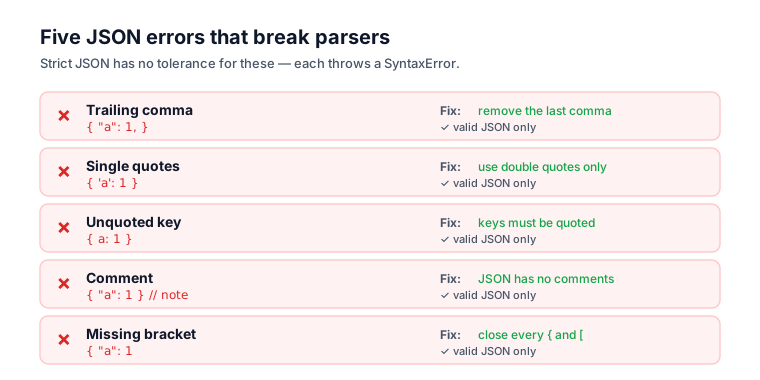
Here's each common error with the exact fix.
Why JSON is so strict
JSON is strict by design, not by accident. Two specs define it identically — RFC 8259 and ECMA-404 — and both forbid the conveniences programming languages allow. The narrow grammar is what makes JSON parse the same everywhere.
JSON was designed as a minimal, unambiguous data format, so the spec forbids a lot of what languages let you get away with: no comments, no trailing commas, no single quotes, no unquoted keys. That rigidity is exactly what makes JSON predictable across every language and parser on earth. The downside is that small habits carried over from JavaScript or Python quietly produce invalid JSON. If you want the broader trade-offs, compare JSON, XML, and YAML.
When you hit an error, paste the payload into the JSON Validator — it points straight at the character where parsing failed, which narrows the hunt enormously.
Error 1: Trailing commas
A trailing comma after the last item in an object or array is invalid JSON, even though JavaScript tolerates it. This is the single most common JSON error, bar none. MDN's JSON.parse docs show it throwing a SyntaxError on exactly this.
// ❌ Invalid
{
  "name": "alice",
  "role": "admin",
}

// ✅ Valid
{
  "name": "alice",
  "role": "admin"
}
That comma after "admin" is illegal. The same rule applies to arrays:
// ❌ Invalid
[1, 2, 3,]

// ✅ Valid
[1, 2, 3]
The fix: drop the comma after the final element in any object or array.
Error 2: Single quotes
JSON requires double quotes for both keys and string values; single quotes are invalid, full stop. RFC 8259 defines a string as beginning and ending with the quotation mark character U+0022, so nothing else delimits a string — even though single quotes are perfectly normal in JavaScript and Python.
// ❌ Invalid
{'name': 'alice'}

// ✅ Valid
{"name": "alice"}
The fix: swap every single quote for a double quote. Watch out for apostrophes living inside strings, though — "it's fine" is valid, but 'it's broken' is not.
Error 3: Unquoted keys
Every key in a JSON object must be a double-quoted string — bare identifiers are invalid. In JavaScript object literals keys often go unquoted, which is exactly the habit that produces broken JSON when you copy a JS object straight into a payload.
// ❌ Invalid
{name: "alice", age: 30}

// ✅ Valid
{"name": "alice", "age": 30}
The fix: wrap every key in double quotes.
Error 4: Comments
JSON has no comment syntax at all — neither // nor /* */ is legal anywhere in a document. The grammar in both RFC 8259 and ECMA-404 simply has no production for comments, so a parser treats them as unexpected tokens and bails.
// ❌ Invalid
{
  "name": "alice", // the user's name
  "role": "admin"
}

// ✅ Valid
{
  "name": "alice",
  "role": "admin"
}
The fix: strip the comments. If you genuinely need commented config, use a format that supports it — JSON5, JSONC, YAML — and convert to plain JSON for transport. (One wrinkle: some tools, like VS Code settings, use JSONC, which does permit comments. That's not standard JSON, so don't ship it to an API expecting the real thing.)
Error 5: Missing or extra commas between elements
Commas separate elements, so every element except the last needs exactly one, and the last needs none. Miss a comma between two pairs, or double one up, and the parser stops at the spot where the count breaks.
// ❌ Invalid (missing comma)
{
  "a": 1
  "b": 2
}

// ❌ Invalid (double comma)
{
  "a": 1,,
  "b": 2
}

// ✅ Valid
{
  "a": 1,
  "b": 2
}
The fix: exactly one comma between elements, and none after the last.
Error 6: Unescaped special characters in strings
Some characters must be escaped with a backslash inside JSON strings: double quotes, backslashes, and control characters like newlines and tabs. A literal newline or an unescaped quote inside a string ends it early, and the parser chokes on whatever follows.
// ❌ Invalid (unescaped quote)
{"message": "She said "hello""}

// ✅ Valid
{"message": "She said \"hello\""}

// ❌ Invalid (literal newline in string)
{"text": "line one
line two"}

// ✅ Valid
{"text": "line one\nline two"}
The fix: escape " as \", \ as \\, newlines as \n, and tabs as \t.
Error 7: Wrong value types
JSON allows exactly seven value types: string, number, object, array, true, false, and null. Anything else — undefined, NaN, Infinity, a leading-zero number — is invalid. The usual offenders:
// ❌ Invalid (undefined isn't a JSON value)
{"value": undefined}

// ❌ Invalid (NaN and Infinity aren't allowed)
{"value": NaN}

// ❌ Invalid (leading zero, or trailing dot)
{"value": 007}
{"value": 5.}

// ❌ Invalid (single quotes again)
{"value": 'text'}

// ✅ Valid
{"value": null}
{"value": 7}
{"value": 5.0}
{"value": "text"}
The fix: use null in place of undefined. JSON has no way to represent NaN or Infinity, so use null or a string instead. And numbers can't carry leading zeros or trailing decimal points.
Error 8: BOM and invisible characters
When JSON looks flawless and still won't parse, the cause is almost always a character you can't see — a byte-order mark (BOM) at the start of the file, a non-breaking space ( ) standing in for a regular space, or a smart quote (" instead of ") that hitched a ride from a word processor.
The fix: these are nearly impossible to catch by eye. The JSON Validator flags the position; if the character there looks fine but still fails, retype it by hand or check for smart quotes that snuck in via copy-paste.
Error 9: Numbers as keys
Object keys are always strings, even when they look like numbers, so {1: "first"} is invalid. Quote the key and it parses fine.
// ❌ Invalid
{1: "first", 2: "second"}

// ✅ Valid
{"1": "first", "2": "second"}
The fix: quote your numeric keys. And a gotcha worth knowing: when you parse this back, the keys come out as strings, not numbers.
A debugging workflow
Work a JSON error in order — read the position, validate, check the four usual suspects, then format — rather than squinting at the whole blob. That sequence resolves the overwhelming majority of failures in seconds.
- Read the position. Most parsers report a character index ("position 42"); the error is usually at or just before that point.
- Paste it into the JSON Validator. It pinpoints the spot and describes the problem.
- Check the usual suspects — trailing comma, single quote, unquoted key, comment. These are 80% of all errors.
- Format it. Once it's valid, run it through the JSON Formatter to see the structure and catch the logical mistakes a validator won't, like wrong nesting. (For pretty-printing options, see how to format JSON.)
JSON5 and relaxed variants
If JSON's strictness grates specifically for config files — not data interchange — relaxed formats like JSON5 allow comments, trailing commas, single quotes, and unquoted keys. The catch: JSON5 is not JSON. Don't send it to an API expecting standard JSON. Use it only where you control both ends, and convert to strict JSON for transport.
The bottom line
JSON is strict by design: no trailing commas, no comments, no single quotes, no unquoted keys. Almost every error you'll hit is one of four — a trailing comma, a single quote, an unquoted key, or a comment — so check those first. Beyond that, escape ", \, and control characters inside strings, use null rather than undefined, and watch for invisible characters like a BOM or smart quotes that cause "impossible" failures. When you're stuck, pinpoint the exact problem with the JSON Validator, then clean it up with the JSON Formatter.
Frequently asked questions
Why does my API reject valid-looking JSON?
Check for trailing commas and comments first. Those two are the most frequent culprits when JSON looks right but fails a strict parser. JavaScript tolerates both, so they slip in by habit. RFC 8259 permits neither, so a conforming API will reject the payload outright.
Can JSON keys be duplicated?
RFC 8259 says behavior is unpredictable when names within an object are not unique. Most parsers keep the last pair, but do not rely on that. Duplicate keys usually signal a bug upstream, so treat them as a defect to fix rather than a feature to use.
Is a single value valid JSON?
Yes. Under RFC 8259 a JSON text is any serialized value, so 42, "hello", true, and null are each complete documents on their own. Older specs required an object or array at the top level, but the current standard removed that restriction.
Why do trailing commas break JSON but work in JavaScript?
JavaScript object and array literals explicitly permit trailing commas for cleaner diffs. JSON is a separate data format with a stricter grammar that has no such allowance. MDN documents that JSON.parse throws a SyntaxError on a trailing comma, so always drop the comma after the final element.