How to Decode JWT Tokens in JavaScript (Without a Library)
A JWT is 3 Base64URL parts split by dots. Decode the header and payload in ~10 lines of plain JavaScript — and learn why decoding never proves a token is real.
JSON Web Tokens are everywhere in modern web apps — Auth0, Firebase Auth, Supabase, custom backends, every OAuth provider under the sun. Sooner or later you'll need to look inside one. Maybe you're debugging why a session expired early, checking what claims an issuer actually sent, or just confirming the user ID in a token matches what you expected.
Good news first: you don't need a library for this. Decoding a JWT in JavaScript takes about ten lines using nothing but built-in browser APIs. The bad news, and it's a sharp one: it's just as easy to do this wrong, the moment you start assuming "decoded" means "verified."
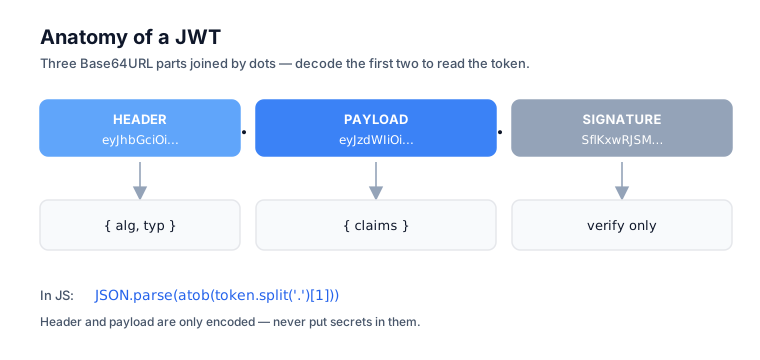
What a JWT actually looks like
A JWT is three Base64URL-encoded strings joined by dots. RFC 7519 defines it as a sequence of URL-safe parts separated by period characters, always represented using the JWS (or JWE) Compact Serialization:
header.payload.signature
Here's a real one:
eyJhbGciOiJIUzI1NiIsInR5cCI6IkpXVCJ9.eyJzdWIiOiIxMjM0NTY3ODkwIiwibmFtZSI6IkpvaG4gRG9lIiwiaWF0IjoxNTE2MjM5MDIyfQ.SflKxwRJSMeKKF2QT4fwpMeJf36POk6yJV_adQssw5c
Three parts, three jobs:
- Header — the algorithm and token type, as JSON
- Payload — the claims (user ID, expiration, custom data), as JSON
- Signature — proof the token wasn't tampered with
The header and payload are not encrypted. They're just Base64URL-encoded JSON, which means anyone holding a copy of the token can read them. (If you're fuzzy on why JWTs use Base64URL rather than plain Base64, see Base64 vs Base64URL.) That fact — readable, not secret — is the entire reason this article exists.
The decoder, in ten lines
To decode a JWT in plain JavaScript, split it on the dots, convert each part from Base64URL back to Base64, decode it with atob, and JSON.parse the result. Here's the whole thing:
function decodeJwt(token) {
  const [headerPart, payloadPart] = token.split('.');
  const decode = (str) => {
    // Base64URL → Base64
    const b64 = str.replace(/-/g, '+').replace(/_/g, '/');
    // Add padding
    const padded = b64 + '='.repeat((4 - (b64.length % 4)) % 4);
    // Decode and parse as UTF-8 JSON
    const json = decodeURIComponent(
      atob(padded)
        .split('')
        .map((c) => '%' + c.charCodeAt(0).toString(16).padStart(2, '0'))
        .join(''),
    );
    return JSON.parse(json);
  };
  return {
    header: decode(headerPart),
    payload: decode(payloadPart),
  };
}
Why is this longer than the bare atob(payload) you'll find in a hundred Stack Overflow answers? Two reasons.
First, Base64URL isn't Base64. JWTs use Base64URL, which swaps + and / for - and _ to stay URL-safe. You have to translate those back before atob will accept the string.
Second, atob doesn't speak UTF-8. As MDN notes, atob decodes to a binary string where each character's code point is one byte. So if a JWT payload contains non-ASCII characters — say a user's Korean name in the name claim — naive decoding hands you mojibake. The decodeURIComponent dance above is what handles UTF-8 correctly.
The signature: what it does, what it doesn't
The signature is the only part of a JWT that proves it's authentic — and the snippet above never touched it. Notice we only decoded the header and payload. We ignored the signature entirely.
The signature is the cryptographic proof that someone who knows the secret key issued this exact token. To verify it, you need two things: the signing secret (for HMAC) or public key (for RSA/ECDSA), and a crypto library — jsonwebtoken, jose, or the Web Crypto API.
Here's why that matters. Without verification, anyone can forge a JWT. Try it: grab a token, decode the payload, change the sub claim to "admin", re-encode it, and send it off. The signature will be invalid — but if your server never checks the signature, you've just handed yourself admin.
Where this matters
Use client-side decoding for display and debugging, never for trust decisions. It's perfectly fine for some things:
- Displaying user info ("Welcome, Alice") from a token your own backend just issued
- Showing an expiration time in the UI
- Debugging tokens during development
It is absolutely not fine for others:
- Authorization decisions — "show the admin panel if
payload.role === 'admin'" - Trusting claims from third-party tokens without server-side verification
- Anything security-critical, full stop
The rule is short enough to memorize: decoding tells you what a token claims; only signature verification tells you whether to believe it. Do verification on the server, where the signing key lives and the attacker doesn't. (For what each of those claims — iss, sub, aud, exp and friends — actually means, see JWT claims explained.)
When to use a library instead
Reach for a real library the moment you need to verify rather than just read — which on a backend is basically always. The ten-line snippet is great for read-only client work, but graduate to a library when:
- You also need to verify signatures (which is basically always, on a backend)
- You want type-safe access to the standard claims —
iss,sub,aud,exp,iat,nbf - You're dealing with encrypted JWTs (JWE) layered on top of signed ones
Three options cover almost every case:
| Option | Use case | Notes |
|---|---|---|
| jose | Verify or sign across Node, browsers, Deno, Bun, and edge runtimes | Zero dependencies, runs on Web Crypto, handles JWS/JWE/JWK/JWT. jwtVerify() validates signature and claims. |
| jsonwebtoken | Node.js backends with HMAC, RSA, or ECDSA keys | Simple sign/verify/decode API. Pass the algorithms option to verify(). decode() reads the payload without checking the signature. |
| Web Crypto API | No dependency at all, browser or edge | Verbose: you split the token, import the key, and call crypto.subtle.verify() yourself. jose wraps exactly this. |
For decode-only use cases in the browser, though, the snippet above is genuinely all you need.
Common gotchas
Most JWT bugs come down to one fix — pin the expected algorithm — plus a couple of encoding traps. A few catch people again and again.
The "alg: none" attack. An attacker rewrites a token's header to say "alg": "none", signaling that integrity was already verified, then strips the signature. Verifiers that honor it skip the check and accept the forgery. The OWASP JWT cheat sheet is blunt about the fix: during validation, explicitly request that the expected algorithm was used, so a none token is rejected outright.
Algorithm confusion. A JWT signed with RS256 (asymmetric) can sometimes be tricked into verifying as HS256 (symmetric) if the verifier is handed the wrong key — the public RSA key gets used as an HMAC secret. The same defense applies: pin a specific expected algorithm, which both jose and jsonwebtoken let you do.
exp is in seconds, not milliseconds. The exp claim is Unix seconds since the epoch; JavaScript's Date.now() is milliseconds. Forgetting to multiply by 1000 is a perennial source of "my tokens expire immediately" bugs. Use the Timestamp Converter to sanity-check the value.
Quick decoder for one-off needs
When you just want a fast look at a token without writing any code, paste it into the JWT Decoder. It splits the parts, decodes the header and payload, and pretty-prints the JSON — all in your browser. The token never leaves your device, which genuinely matters here, because tokens are credentials.
If you'd rather see the raw Base64URL decoding without the JWT structure on top, the Base64 Encoder handles plain decoding.
The bottom line
A JWT is three Base64URL strings joined by dots, and the header and payload decode in about ten lines of JavaScript. But the signature is the only thing that proves a token is authentic, and it has to be verified server-side — never make a trust decision based on decoded payload data alone. For one-off debugging, a browser-local tool saves you from writing throwaway code in the first place.
Frequently asked questions
Is decoding a JWT the same as verifying it?
No. Decoding just Base64URL-decodes the header and payload into readable JSON — it checks nothing. Verifying recomputes the signature with the signing key to prove the token is authentic and untampered. You can decode any token; you can only verify one if you hold the correct key.
Can I trust a decoded JWT payload?
Not for anything security-critical. The payload is only Base64URL-encoded, not encrypted, so anyone can read or rewrite it and re-encode a forgery. Trust the payload only after the signature verifies on your server. Client-side decoded data is fine for display, never for authorization decisions.
How do I verify a JWT signature in JavaScript?
Use a library and the signing key. On Node, jsonwebtoken's verify() or jose's jwtVerify() recompute the signature and validate claims. In browsers or edge runtimes, jose runs on the Web Crypto API with zero dependencies. Always pass an explicit algorithm so alg confusion attacks fail.
What is the alg:none attack?
An attacker edits a token's header to "alg":"none", claiming integrity was already checked, then drops the signature. Verifiers that honor it skip the signature check and accept the forgery. OWASP's fix is to explicitly require the expected algorithm during verification, so a none token is rejected.
Why is my JWT decoder returning garbled characters?
Two likely causes. JWTs use Base64URL, so you must swap - and _ back to + and / before atob accepts the string. And atob returns a binary string, not UTF-8, so non-ASCII claims like a name need a decodeURIComponent pass to render correctly instead of mojibake.