Regex Flags Explained: g, i, m, s, u, y, d
JavaScript has 8 regex flags — g, i, m, s, u, y, d, and the newer v. Learn what each one really does, when you need it, and the bug each one quietly fixes.
JavaScript has eight regex flags — g, i, m, s, u, y, d, and the newer v — and most day-to-day frustration with regular expressions traces back to a single one of those letters tacked onto the end. Why does replace() only swap the first match? Why does match() return null on a multiline string? Why won't . match a newline? Nine times out of ten the answer is the same: you needed a flag and didn't have it.
So here's every JavaScript regex flag — what it does, when it landed in the language, and the most common bug it quietly fixes. The full reference lives in the MDN regular expressions guide, but this page is the practical version.
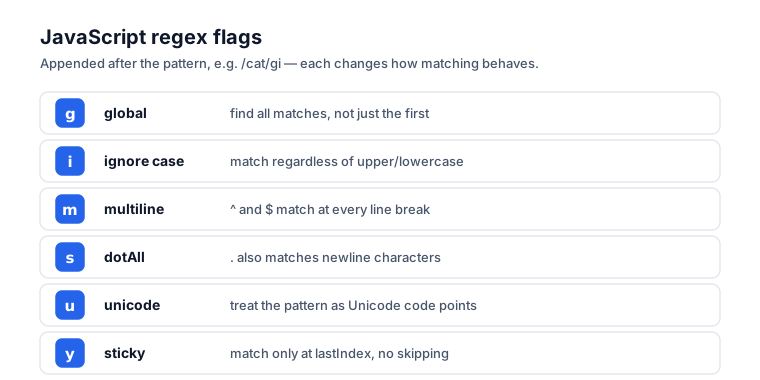
The flags at a glance
| Flag | Name | What it changes | Since |
|---|---|---|---|
g | global | Find all matches, not just the first | ES3 |
i | ignore case | A matches a | ES3 |
m | multiline | ^ and $ match line boundaries, not just string boundaries | ES3 |
s | dotAll | . matches newlines too | ES2018 |
u | unicode | Treat surrogate pairs as single characters; enable \p{} | ES2015 |
y | sticky | Match only at lastIndex, no skipping | ES2015 |
d | indices | Include match start/end positions in results | ES2022 |
v | unicodeSets | Upgraded u with set notation in character classes | ES2024 |
One thing up front: order doesn't matter. /foo/gi and /foo/ig are exactly the same — the flags are a set, not a sequence.
g — global
Without g, regex operations stop dead at the first match.
'hello hello hello'.replace(/hello/, 'hi');
// → 'hi hello hello'  ← only the first

'hello hello hello'.replace(/hello/g, 'hi');
// → 'hi hi hi'  ← all of them
Most "why didn't it replace all my matches" questions come down to a missing g. Modern JavaScript has replaceAll(), which doesn't need it for simple cases, but matchAll() and patterns with side effects still do. (g is also what enables matchAll() in the first place — per MDN, calling matchAll on a regex without the g flag throws a TypeError.)
i — ignore case
This makes the whole pattern case-insensitive.
/cat/.test('Cat');     // false
/cat/i.test('Cat');    // true
/cat/i.test('CAT');    // true
Worth noting: this applies to the entire pattern, not just literal characters. \w+, \b, and [a-z] all turn case-insensitive too.
There's one trap. By default i does not do Unicode case folding. For that you combine it with u:
/i/i.test('İ');     // false in some engines  (Turkish dotted I)
/i/iu.test('İ');    // depends, but more predictable
m — multiline
The m flag changes what ^ and $ mean. Without it, ^ matches the very start of the string and $ matches the very end. With it, ^ matches the start of any line and $ matches the end of any line.
const text = 'first\nsecond\nthird';

text.match(/^second/);     // null  (second isn't at the very start)
text.match(/^second/m);    // ['second']  (start of a line)
The common use is validating each line of a multiline input on its own, or pulling items out of log files line by line.
s — dotAll
This one makes . match newlines, which it normally won't.
By default, . matches any character except line terminators — and that's a frequent source of bugs when you're parsing multi-line content.
'foo\nbar'.match(/foo.bar/);     // null  (. doesn't cross \n)
'foo\nbar'.match(/foo.bar/s);    // ['foo\nbar']
If you're trying to match a tag's contents across line breaks, like <div>(.*?)</div>, you almost certainly want s.
u — unicode
The u flag makes regex treat the string as a sequence of Unicode code points rather than UTF-16 code units. That matters for anything outside the Basic Multilingual Plane — emoji, mathematical symbols, some CJK characters.
Without u, an emoji gets seen as two characters:
'😀'.length;                  // 2 (surrogate pair)
/^.$/.test('😀');             // false (matched as two chars)
With u, it's treated as one:
/^.$/u.test('😀'); // true
u landed in ES2015 and also unlocks Unicode property escapes like \p{Letter} and \p{Emoji}:
/^\p{Emoji}+$/u.test('😀🎉');  // true
/^\p{L}+$/u.test('안녕');       // true (Korean letters)
If you work with international content at all, just default to u. (Validating identifiers rather than free text? The rules differ by style — see our guide to naming conventions for the patterns each case style expects.)
y — sticky
The sticky flag restricts a match to begin exactly at lastIndex — no skipping ahead to find one somewhere later.
const re = /foo/y;
re.lastIndex = 0;
re.exec('barfoo');     // null  (doesn't skip past 'bar')

re.lastIndex = 3;
re.exec('barfoo');     // ['foo']  (matches at exact position)
It's most useful in tokenizers and parsers that need to consume input one token at a time without backtracking.
d — indices (newer)
The d flag adds an indices property to the match result, holding the start and end positions of each capture group. It arrived in ES2022.
const re = /(\w+) (\w+)/d;
const match = re.exec('hello world');
match.indices;     // [[0, 11], [0, 5], [6, 11]]
//                    full match, group 1, group 2
(Note that exec() is a method on the regex, not the string — re.exec(str), not the other way around.) It's handy when you need to substring around matches without re-counting characters by hand. Available in Node 16+ and modern browsers since around September 2021.
v — unicodeSets (newest)
The v flag is an upgraded version of u. It turns on unicodeSets mode, which adds set notation inside character classes — intersection (&&), subtraction (--), and nesting — plus matching of multi-code-point strings. It reached the spec in ES2024.
// letters that are also Greek
/[\p{Letter}&&\p{Script=Greek}]/v.test('α');   // true
/[\p{Letter}&&\p{Script=Greek}]/v.test('a');   // false (not Greek)

// any letter except the vowels
/[\p{Letter}--[aeiou]]/v.test('b');            // true
You can't combine v and u — they interpret the same pattern in incompatible ways, so using both throws a SyntaxError. Reach for v when you need expressive character-class math; otherwise plain u is still perfectly fine.
Combinations you'll actually use
A few combinations come up so often they're worth committing to memory:
gi— find all matches, case-insensitive (the most common pairing by far)gm— find all matches across multiple lines using^/$anchorsgsi— case-insensitive multiline scrape that includes newlines (think: extract every<style>...</style>block)gu— global and Unicode-safe (your default for any international content)
For fixed-format strings, anchoring usually matters more than flags. A pattern to validate a UUID, for instance, wants ^...$ with i for the hex digits and no g at all, since you're testing a single value rather than scanning for many.
Common bugs traced to a missing flag
When a regex misbehaves, it's almost always a flag. A quick field guide:
"My pattern works in the tester but not in code." The tester probably had g enabled by default and you copied the pattern without it.
". is not matching some characters." You hit a newline. Add s.
"Emoji are matching as two characters." Add u.
"Validation passes empty strings." You forgot anchors. Use ^pattern$, and probably m too if the input might contain newlines.
"match() returns groups on the first call but null on the second." You're reusing a /g regex that carries lastIndex state between calls. Either use matchAll() or reset lastIndex = 0 each time.
Test before you ship
The fastest way to nail down a regex is to test it against real samples, interactively, before it ever touches your code. The Regex Tester lets you toggle every flag, see matches highlighted right in your test string, and inspect capture groups — all in your browser. Build the pattern against three or four representative inputs first, then paste it in with confidence.
The bottom line
g finds all matches, i ignores case, and m makes the anchors line-aware. s lets . match newlines, u keeps you Unicode-safe, y pins matches to a position for parsers, d gives you match indices, and v adds set notation for serious Unicode work. If you touch non-ASCII content, default to u. And when a regex stubbornly refuses to match what you expected, check your flags before you check anything else.
Frequently asked questions
Why does my regex only match or replace once?
You almost certainly forgot the g (global) flag. Without it, replace() and match() stop at the first match. Add g to get every occurrence — for example, /hello/g instead of /hello/. Modern replaceAll() avoids this for simple cases, but matchAll() still requires g.
Why won't my dot (.) match a newline?
By default the dot matches any character except line terminators, so it stops at \n. Add the s (dotAll) flag, introduced in ES2018, to make . match newlines too. This is the usual fix when scraping multi-line content like a tag's contents across line breaks.
Why does my regex match emoji as two characters?
Emoji and other characters outside the Basic Multilingual Plane are stored as UTF-16 surrogate pairs, so a plain regex sees them as two units. Add the u (unicode) flag, from ES2015, to treat each as a single code point and to unlock \p{} property escapes.
Does the order of regex flags matter?
No. /foo/gi and /foo/ig are identical — flags are a set, not a sequence. JavaScript even normalizes the flags property into a fixed alphabetical-ish order (d, g, i, m, s, u, v, y) regardless of how you wrote them in the literal.
Why does match() return groups once and then null on the next call?
You are reusing a regex that has the g (or y) flag, which keeps a lastIndex value between calls. The second call resumes from where the first stopped and eventually returns null. Either use matchAll(), build a fresh regex, or reset lastIndex = 0 before each call.